


Scandit SDK Showcase
3.981.00 Reviews
App Specs
- Version
- 8.6.2
- Updated On
- License
- Free
- Downloads
- 500,000+
- Developer
- Scandit AG.
- Categories
- Libraries & Demo
- Platform
- Android, iOS
Screenshots
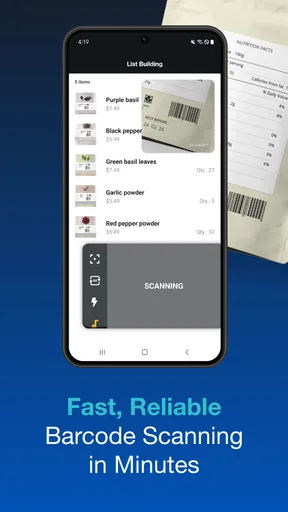
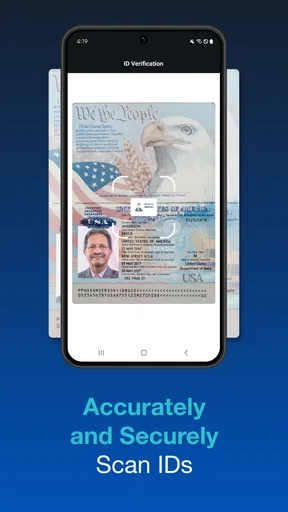
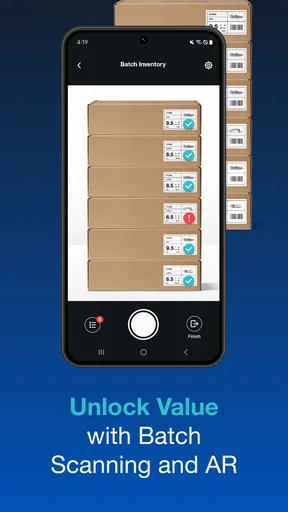
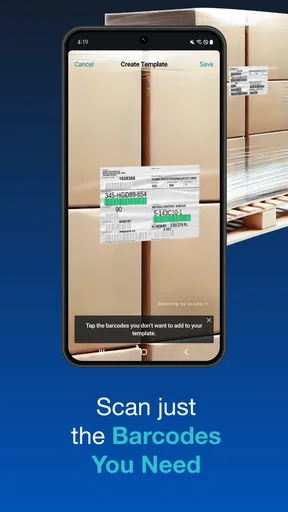
 Analysis by AppCompare
I’d treat Scandit SDK Showcase as a hands-on way to judge a scanning technology, rather than as a polished barcode utility for everyday shopping. Its central appeal is seeing how Scandit’s scanning SDK behaves through a phone camera: you can try the experience directly instead of relying only on a feature list or a developer presentation. That distinction matters if you’re choosing a scanning approach for an app, or simply curious about what a camera can recognize.
What the camera-based demo is useful for
A scanning demo is most valuable when it helps you assess the whole interaction, not just whether a code can be read. I would pay attention to how quickly the camera finds a code, whether it stays usable when the label is not perfectly positioned, and how clearly the app communicates a successful scan. These details affect whether scanning feels dependable in a real workflow, where people may be moving quickly or using a phone one-handed.
The app is published by Scandit AG and belongs to the libraries and demo side of the app world. That makes its purpose different from a typical consumer scanner: it gives interested users a way to evaluate Scandit’s barcode and ID scanning SDK, rather than promising to organize a personal collection or manage purchases. It is free, rated for Everyone, and the current version is 8.4.1, with Android 7.0 as the minimum operating system.
That focus also makes the audience a little unusual. You do not have to be a developer to open it and explore, but the clearest payoff is for someone who needs to make a decision about scanning technology. If you only want to read a product code once in a while, your phone’s built-in camera or a simple barcode app may be more direct. If you want to see how a scanning SDK feels before planning an implementation, a dedicated showcase is much more relevant.
Getting to Know Scandit SDK Showcase
So, what exactly is this Scandit SDK Showcase? It’s an app that demonstrates the capabilities of Scandit's Barcode Scanner SDK. If you’re into tech or just love experimenting with the latest tools, this app is a playground for you.
Upon launching the app, you’re greeted with a sleek and simple interface. No clutter, just straightforward buttons that guide you through the various features. It’s designed to be user-friendly, so even if you’re not a techie, you’ll feel right at home.
Exploring the Features
One of the first things I noticed was the speed and accuracy. The app can scan all sorts of barcodes in the blink of an eye. Whether it's a traditional UPC or those fancy 2D QR codes, this app handles them like a pro. And the best part? It does it all with your device’s camera, making it super convenient.
Worth Reading Before You Choose

EA SPORTS FC Mobile 26 Is a Bigger Football Game, but It Takes Time

Flipboard Shows What News Apps Must Do Beyond the Feed

Switching to Android Auto Means Rethinking Your Driving Routine

Google Calendar Makes a Crowded Week Easier to Manage

Ludo King Makes the Most of the Minutes Between Plans

Baby Panda World Brings Quick Play to Modern Phones, but Its Game Library Feels Busy
Another feature that caught my eye is the augmented reality overlay. This isn’t just a gimmick; it genuinely enhances the scanning experience. Imagine being able to see relevant product information overlaid on the barcode itself. It’s like having a mini heads-up display right on your phone.
For the developers out there, the app showcases how you can integrate these features into your own projects. It’s a real-time demo that gives you a taste of what’s possible with the Scandit SDK. Pretty neat, right?
Why It Stands Out
The Scandit SDK Showcase app stands out because of its versatility. It's not just a barcode scanner; it's a tool that can be customized for a range of applications. Whether you’re in retail, healthcare, or logistics, this app shows how barcode scanning can be a game-changer.
I also love the fact that it’s constantly updated. The developers behind Scandit are always looking for ways to improve, ensuring the app remains top-notch. Plus, their support team is incredibly responsive, which is a huge plus in my book.
Putting the demo to work
For a practical evaluation, I’d start with the labels your intended users actually encounter. A clean code on a desk is an easy test; a code on a curved package, a small label, or a printed sheet viewed at an angle is more revealing. Try those situations at a comfortable pace and then under the conditions your workflow demands. The point is not to chase a perfect result in a single attempt, but to notice where the experience feels forgiving and where users might need guidance.
A useful trial is to compare scanning on the same phone with the camera app or a basic scanner you already know. The ordinary camera may be enough for occasional QR-code reading, while a general scanner may offer a convenient history of past results. The Showcase has a different job: it lets you judge the scanning approach as an SDK demonstration. I would compare the time and effort it takes to reach a result, the feedback during capture, and whether the displayed behavior would make sense inside the app you plan to build.
One non-obvious tip is to test the complete handoff after recognition, not just the moment the code is detected. In a real product, a scan is useful only if its result leads to a clear next action: checking an item, confirming a label, or moving to another step. Watch how the demo presents the result and ask what your own software would need to do next. That small exercise can reveal whether your project needs a scanner alone or a wider workflow around it.
A realistic fit for retail and operations
Imagine a retail team assessing whether phone-based scanning could help staff check a shelf or identify an item without carrying a separate scanner. A developer could bring a few representative product labels to a short evaluation, let colleagues try the camera interaction, and note where they hesitate. The showcase can help make that discussion concrete: people can react to the scanning experience itself rather than guessing from a technical description.
The same approach can help when considering logistics or healthcare workflows, but I would be careful not to treat a successful demo scan as proof that an entire operation is ready. A production workflow may involve different labels, lighting, devices, training, and software steps. The app is a useful starting point for evaluating the SDK’s interaction; the team still needs to test its own materials and decide how recognition fits into its systems.
For a developer, I’d use the demo to form sharper questions before committing engineering time. Does the scanning experience suit the people who will use the app? Which code types matter in the actual workflow? What should happen when a scan is unclear or the wrong label is presented? Those questions are more useful than simply deciding that a scanner appears fast in a quiet test.
Where the trade-offs become clear
The main limitation is also the app’s defining boundary: this is a showcase, not a complete business tool. It can help you explore scanning, but it should not be mistaken for an inventory manager, a point-of-sale system, or a records platform. If your need is to keep a list of household items or quickly open QR links, a simpler app may be easier to use because it is designed around that end result rather than SDK evaluation.
There is also a difference between watching a feature in a demo and knowing how it will behave in your own app. A camera interaction that feels smooth in one test still has to be considered alongside device choice, user instructions, label quality, and what happens after a scan. I would use the Showcase to assess the experience and narrow down requirements, not as a substitute for testing a finished workflow with the people who will rely on it.
The augmented-reality presentation is interesting, but I would judge it by whether it helps someone understand or act on a scan. An overlay can make a result easier to interpret; it can also distract if it adds visual material without helping the task. When evaluating it, focus on the user’s job: can they identify the relevant information quickly, and is the screen still clear enough to continue? That is a better test than treating a visual effect as valuable simply because it looks advanced.
Scandit SDK Showcase has an average rating of 3.9 from around 1.6 thousand ratings, alongside about 80 written reviews, and it has been installed over 500 thousand times. Those figures suggest that people do try it, but I would not use popularity alone to decide whether the SDK suits a particular project. The better test is still whether the scanning behavior fits your labels, devices, and intended users.
Who gets the most from it
I’d recommend trying it if you are a developer, product planner, or technically curious user who wants to see Scandit’s scanning SDK in action before making a more involved decision. It is especially useful when a team needs a shared reference point for discussing camera scanning: everyone can observe the same interaction and describe what works for their planned use.
I’d skip it if you want a general-purpose scanner with a personal library, a shopping assistant, or a complete stock-control workflow. Those needs call for apps built around saving, sorting, or acting on scan results. This demo is more useful when the question is “How does this SDK behave?” than “What can I do with my scanned codes afterward?”
Final Thoughts
To wrap it up, the Scandit SDK Showcase is more than just a demo app. It’s a powerful tool that showcases the potential of barcode scanning technology. Whether you’re a curious user or a developer looking to integrate scanning capabilities into your apps, this is a must-try.
With its intuitive interface, robust features, and endless possibilities, it’s no wonder this app is making waves. Give it a try, and you might just find yourself scanning everything in sight!
Pros
- Fast and accurate barcode scanning.
- Supports a wide range of barcode types.
- Seamless integration with existing apps.
- Offline functionality available.
- Customizable user interface options.
Cons
- Requires a modern device for optimal performance.
- Subscription-based pricing model.
- Limited free trial features.
- UI customization needs some coding skills.
- High battery consumption during extended use.
FAQs for Scandit SDK Showcase
What is the Scandit SDK Showcase app used for?
The Scandit SDK Showcase app is designed to demonstrate the capabilities of Scandit’s barcode scanning technology. It allows users to explore and test features such as barcode scanning, augmented reality (AR) overlays, and data capture. This app is particularly useful for developers and businesses looking to implement advanced scanning solutions in their applications.
Which devices are compatible with the Scandit SDK Showcase app?
The Scandit SDK Showcase app is compatible with both Android and iOS devices. However, for the best performance, it is recommended to use devices with a good camera and running on recent OS versions. Always check the app store description for the latest compatibility requirements to ensure optimal functionality.
Does the Scandit SDK Showcase app require an internet connection?
The app can function without an internet connection for basic barcode scanning. However, certain features, such as accessing cloud-based functionalities or updates, may require an internet connection. It is advisable to have connectivity for a complete experience and to explore all available features.
Is the Scandit SDK Showcase app free to use?
Yes, the Scandit SDK Showcase app is free to download and use. It serves as a demonstration of Scandit's technology. However, if you choose to integrate Scandit’s SDK into your own applications, there may be licensing fees involved, depending on your usage and requirements.
Can the Scandit SDK Showcase app scan all types of barcodes?
The app supports a wide range of barcode formats, including 1D and 2D barcodes such as QR codes, UPC, EAN, and more. It is designed to showcase the versatility and power of Scandit’s scanning technology, making it suitable for various industries and use cases. Always refer to the official documentation for a comprehensive list of supported formats.


